Belajar membuat template akan kita lanjutkan setelah saya istirahat beberapa lamanya hehe… , maklum…masih ada yang diurus agar “Dapur” ngebullll . :D .
Baiklah sekarang mari kita lanjutkan dengan terlebih dulu baca doa agar diberi kemudahan dalam memahami ilmu . Untuk sekedar mengingat , di pelajaran membuat template bagian pertama , terakhir kita sudah sampai pada pembuatan template ke empat yang kita kasih nama : template-pertamaSTEP4.html
Di situ kita sudah mulai menambahkan pengaturan posisi dengan tag kode float:left
Sebagai pembanding , anda bisa membuka kode-kode template hasil praktek anda , dengan yang saya buat disini sebagai berikut :
template-pertamaSTEP1
template-pertamaSTEP2
template-pertamaSTEP3
template-pertamaSTEP4
template-pertamaSTEP5
Catatan : Saya sengaja membuat template-pertamaSTEP5 , setelah ada perubahan pada panambahan kode float:left yang ada di template-pertamaSTEP4 . Ini sengaja saya buat satu file baru untuk memudahkan saya dalam memahami pembuatan template.
Catatan 2 : Sebaiknya buka masing-masing file di tab jendela baru , agar kita bisa melihat perbedaan dari setiap tahapan pembuatan template.
Catatan 3 : Anda bisa menyimpan kode yang ada dihalaman yang anda buka , dengan cara : klik File pada tab mozila, lalu klik save page as,simpan di komputer anda. Nanti hasil download file tersebut buka dengan cara klik kanan pada file hasil download, lalu klik open with mozilla .
Oke ya kita Lanjuuuttttt…..
Di file template-pertamaSTEP5 , jika anda buka di browser , posisi sidebar sudah bergeser kekanan , sesuai dengan yang kita inginkan. (dari rencana layout blog )
Tapi Sidebar-kanan dan sidebar kiri masih numpuk atas bawah. Nah …, mari buka lagi notepad baru , dan copas semua kode yang ada di template-pertamaSTEP5 , dan coba tambahkan lagi kode float:left di bagian CSS pengaturan sidebar , tepatnya di #ruang-Sidebar-kanan dan #ruang-Sidebar-kiri
Sehingga setelah ditambahkan akan menjadi seperti ini :
#ruang-Sidebar-kanan {
width:150px;
border:1px solid #000;
background:#bbc;
padding:3px;
float:left
}
#ruang-Sidebar-kiri {
width:150px;
border:1px solid #000;
background:#ccd;
padding:3px;
float:left
}
Save as lagi dengan nama template-pertamaSTEP6.html
Kemudian buka template-pertamaSTEP6 di browser , bagaimana hasilnya ???
Sudah pindah mas..tapi kok ya Sidebar-kanan adanya di kiri dan Sidebar kiri adanya di kanan? :D
Nahhh…. Mari kita bahas masalah ini …
Sebenarnya kita bisa saja merubah #ruang-Sidebar-kanan dengan memberikan kode float nya : float:right
Tapi karena saya ingin supaya kita lebih memahami struktur template , maka sengaja saya kasih kode dengan float:left
Ketika kita mengatur semua posisi dengan float left , maka secara otomatis layout yang ada di bagian teratas akan lebih dulu menempati posisi di sebelah kiri . Mari kita melihat lagi struktur pada bagian ISI ( kalau saya bilang isi, berarti itu adalah yang ada di bagian setelah tag <body”> dengan </body”> ) khususnya sidebar sebagai berikut : :
<div id="ruang-Sidebar">
<div id="ruang-Sidebar-top-besar">Isi ruang-Sidebar-top-besar</div>
<div id="ruang-Sidebar-kanan">Isi ruang-Sidebar-kanan</div>
<div id="ruang-Sidebar-kiri">Isi ruang-Sidebar-kiri</div>
</div>
Disitu kita lihat bahwa saya menempatkan sidebar kanan berada diatas sidebar kiri . Jadi jelas si CSS akan mengutamakan sidebar kanan agar menempati posisi kiri . Begitu juga sebaliknya Jikalau kita mengatur kedua nya dengan float:right , maka sidebar kanan pun akan langsung menempati posisi ke kanan. Untuk saya, saya lebih suka merubah posisi ISI sidebar kiri diatas sidebar kanan .
Anda bisa melihat contoh nya disini : template-pertamaSTEP6.html
Sampai disini mudah-mudah anda kita bisa memahami soal floating ini ya …? . Jika sudah paham ,nantinya anda bisa saja misalnya menempatkan Kotak posting disebelah kanan, dan Kotak sidebar disebelah kiri halaman….. di coba2 aja dahhhhh
Catatan : di template-pertamaSTEP6 ini saya sudah menambahkan pengaturan margin:2px; , agar masing-masing bagian sedikit agak terpisah.
Di templatetahap6 ini, kalau kita perhatikan , bagian footernya ,seperti menghilang dilindas oleh sidebar, untuk itu saya menambahkan kode : Overflow:hidden; pada css :
#tembok-utama ,
#kotak-posting dan dibagian
#ruang-Sidebar
Contoh realnya bisa anda lihat disini : template-pertamaSTEP7.html . Silahkan dibandingkan perbedaanya dengan template6.
Sedangkan di template-pertamaSTEP8.html , saya mengatur lebar Kotak posting dan kotak sidebar agar terlihat rapih, yaitu :
memperkecil lebar #kotakblog menjadi: 930px
memperbesar #ruang-Sidebar menjadi 395px
Memperlebar #ruang-Sidebar-top-besar menjadi 385px
Memperlebar #ruang-Sidebar-kanan menjadi 185px
Memperlebar #ruang-Sidebar-kiri menjadi 186px
Memperlebar #isi-Posting menjadi 485px
Di template tahap8 ini saya juga membuat posisi body template menjadi center dengan merubah pengaturan margin dibagian CSS #kotakblog menjadi margin:0 auto;
Contoh realnya bisa anda lihat disini : template-pertamaSTEP8.html
Nahhhh…kini template kita sudah mulai terbentuk dengan teratur dan sudah enak dilihat.
Catatan : Perubahan(Penambahan ) kode di bagian CSS letaknya ada didalam kurung besar { } , contoh :
#ruang-Sidebar { disini tempat penambahan kode }
Setiap kode yang ada di dalam kurung CSS mempunyai ciri sbb :
Keterangan benda – titik dua – nilai - titik koma , contoh :
width:485px;
width –> keterangan yang menerangkan benda/objek yang akan diatur besaran atau nilainya
titik dua –> pengganti samadengan (=)
485px –> nilai dari si benda(objek)
titik koma –> akhir dari nilai objek
Baiklah teman saya kira saya cukupkan dulu uraian pengalaman saya dalam membuat template ,karena sudah terlalu panjang halaman nya , silahkan dibandingkan setiap perubahan yang telah kita lakukan mulai dari template-pertamaSTEP1 sampai dengan template-pertamaSTEP8
Pada sesi membuat template tahap tiga kita akan coba memasukkan konten atau isi dari setiap bagian, agar template kita terlihat mendekati nyata. Dan pada sesi membuat template tahap empat , Inysa Allah kita baru akan memasukkan kode-kode blogspot yang merupakan kode-kode database tempat penyimpanan konten blog kita .
Semoga bermanfaat
PS : Karena ada yang nanya saya : ” mas Bahrul belajar bikin template dimana ? ”
Silahkan yang mau belajar membuat template yg lebih detail ,dengan tutorial bahasa Indonesia , disini aja ya : Kursus HTML dan PHP utk belajar bikin template
Dari : http://www.bahrul-ulum.com/
Read More..
Minggu, 29 Mei 2011


Cara merubah atau mengedit template Blog
Tips ini saya tuliskan dengan tujuan agar sahabat yang mengalami kesulitan dalam menata blog / web nya bisa ter atasi. Cara ini bisa pula dijadikan dasar untuk mulai membuat atau mendesain template sendiri.
Saya katakan aman , karena proses utak-atiknya tidak akan mengganggu web kita yg sedang online.
Dan saya katakan mudah karena kita cukup hanya “Mencontek” dari template yang sudah ada.
Cara pertama bisa dengan menggunakan tool “XAMPP” yg cara peng aktifan nya bisa lihat di Cara instal Xampp
Cara kedua : Kita hanya menggunakan tool seadanya ( Yg ada di komputer kita )
Yaitu :
1. Browser Mozilla Firefox
2. Microsoft Paint
3. Microsoft Office Picture Manager
4. Template Blog dengan CMS Blogspot/themes wordpress.org
5. Notepad/microsoft Frontpage
Nah..yg kita bahas adalah cara yg kedua ini ya
Langkah pertama :
1. Buka web/blog kita yang mau di edit tampilan Layout (Themes/template ) nya
2. Cari web lain yang menurut kita bagus, atau yg ingin kita tiru tampilannya . Atau bisa juga dengan mendownload nya
Langkah Kedua :
1. Di halaman website kita , klik Tab ” File” di browser mozilla ,
2. Klik “Save as” dan simpan dengan nama terserah anda misalnya kita simpan dengan nama “Webku-edit” . Lalu web orang lain juga disimpan (Save as) dengan nama misalnya “Webcontoh-edit” (tanpa tanda petik”)
3. Simpan di folder di hardisk kita,
Lakukan hal yg sama dengan halaman web yg akan ditiru
4. Setelah di save as , maka akan tersimpan satu file ber ekstensi HTML (file HTML) dan satu folder yang isinya adalah semua yang dibutuhkan oleh “layout bayangan” (Folder isi )web kita agar bisa dibuka di browser
5. Kemudian klik dua kali file ber ekstensi HTML agar bisa terbuka di browser . maka “layout bayangan” web kita akan tampil sama persis dengan web asli nya.
Jika kita sedang online , maka semua nya akan tampil sempurna. Tapi jika tidak online ,maka ada beberapa image yang tidak akan muncul.
Solusinya , coba kita copy image yang ada di themes kita ke dalam folder
(Folder isi ) .
6. Kemudian untuk memulai mengedit nya . Kita klik kanan “File HTML ” tadi lalu klik “edit” , atau bisa juga dengan Klik kanan + Open with : pilih dengan notepad atau dengan MS front page.
PS : jadi file HTML ini kita buka dua kali , yaitu dibuka dengan browser mozilla agar bisa terlihat tampilan aslinya , dan juga dibuka dengan Notepad /frontpage , agar bisa di edit.
Untuk merubah dan menggeser misalnya lebar sidebar ,lebar postingan , footer , header dll , maka kita buka file style.css yang ada di (Folder isi) , yg tadi ter download.
Bandingkan dengan tampilan yg ada di web yg ingin kita tiru , baik itu file HTML nya , dan juga file style.css nya.
Catatan : Jika dihalaman web kita ada iklan adsense nya , maka ubahlah dulu angka pub id nya dengan huruf xxxxxx
contoh : PUB -ID : xxxxxxxxxx
Nah… sekarang saat nya kita coba2 untuk merubah atau mengedit , plus sekalian belajar men desain web dengan cara yang sederhana.
Sacara umum , template/themes itu biasanya terbagi menjadi :
Bagian keseluruhan halaman
Bagian Header
Bagian Sidebar
Bagian Body artikel
Bagian Footer
Untuk keseluruhan halaman , pengaturannya akan ditandai dengan awalan :
body
dan didepannya biasanya ada tanda ‘#’ atau . (titik)
contoh #body atau .body
Untuk Header , pengaturannya akan ditandai dengan awalan :
header
dan didepannya biasanya ada tanda ‘#’ atau . (titik)
contoh #header atau .header
Untuk Sidebar pengaturannya akan ditandai dengan awalan :
sidebar
dan didepannya biasanya ada tanda ‘#’ atau . (titik)
contoh #sidebar atau .sidebar
Untuk Body artikel pengaturannya akan ditandai dengan awalan :
post atau kadang content
dan didepannya biasanya ada tanda ‘#’ atau . (titik)
contoh #post atau .post
Untuk Footer pengaturannya akan ditandai dengan awalan :
footer
dan didepannya biasanya ada tanda ‘#’ atau . (titik)
contoh #footer atau .footer
Untuk Tab Navigasi… ini optional , tapi kadang kita perlukan.
nah Untuk Navigasi , pengaturannya akan ditandai dengan awalan :
navigaton atau kadang menu
dan didepannya biasanya ada tanda ‘#’ atau . (titik)
contoh #navigaton atau .navigaton
Oke..itu dasar2 yg ada di themes/template kita…
Sekarang kita bahas struktur kode2 nya
Untuk Themes yg ada di wordpress.org (domain berbayar) sebenarnya lebih mudah , karena biasanya sruktur antara body, header,sidebar,post,dan footer , dan style.css semua nya dipisah
Yang agak sulit di blogspot , karena semua struktur file dijadikan satu halaman. yakni sbb :
<?xml version=”1.0″ encoding=”UTF-8″ ?>
………………………….dst..dst…
(disini tempat keterangan asal CMS)
<head>
……..disini berisi title blog dengan meta tag sllnya
<b:skin><
Langkah selajutnya, anda copy script yang akan anda post di halaman blog anda, ke box tersebut. Setelah itu anda click tombol encode maka script anda akan berubah bentuk. Yang terakhir, anda copy script yang sudah di encode lalu paste ke posting anda. Nah, sekarang sudah nggak bingung lagi kan. Makanya lain kali kalo sempet mampir lagi ke blog ini, dan silahkan baca lagi tips lain nya. yo wiiiss...
Dari : http://tipspack.blogspot.com/
Read More..
Cara menambah status YM di Blogger
Pada posti ngan kali ini kita berjumpa kembali dengan saya yang berada di Pulau Kalimantan belahan Selatan, saya akan berbagi ilmu kepada sampian sabarataan setelah melanglangbuana ke jagat raya melalui kabel telkom yang saya miliki , kali ini kita akan membahas masalah status kita di blog apakah online atau offline supaya pengunjung mengetahui keberadaan kita di blog apakah online atau offline berikut cara memasang code scriptnya
caranya..
1. Log in blogger.com
2. Dasbor > tata letak > elemen laman
3. Tambah gadget > HTML/javascript
4. Copas kode di bawah ini
<a target="_blank" href="http://ymgen.com/chat.php?idne=ganti"> <img border="0" src="http://ymgen.com/ym.php?id2=ganti&s2=54"></a>

<a target="_blank" href="http://ymgen.com/chat.php?idne=ganti""> <img border="0" src="http://ymgen.com/ym.php?id2=ganti&s2=54"></a>
<a target="_blank" href="http://ymgen.com/chat.php?idne=ganti">
<img border="0" src="http://ymgen.com/ym.php?id2=ganti&s2=1"></a>
ket :
ganti ID YM saya/tulisan berwarna merah dengan ID YM yg anda miliki.
5. Simpan
Dari : http://infoneka.blogspot.com/
 ngan kali ini kita berjumpa kembali dengan saya yang berada di Pulau Kalimantan belahan Selatan, saya akan berbagi ilmu kepada sampian sabarataan setelah melanglangbuana ke jagat raya melalui kabel telkom yang saya miliki , kali ini kita akan membahas masalah status kita di blog apakah online atau offline supaya pengunjung mengetahui keberadaan kita di blog apakah online atau offline berikut cara memasang code scriptnya
caranya..
1. Log in blogger.com
2. Dasbor > tata letak > elemen laman
3. Tambah gadget > HTML/javascript
4. Copas kode di bawah ini
<a target="_blank" href="http://ymgen.com/chat.php?idne=ganti"> <img border="0" src="http://ymgen.com/ym.php?id2=ganti&s2=54"></a>

<a target="_blank" href="http://ymgen.com/chat.php?idne=ganti""> <img border="0" src="http://ymgen.com/ym.php?id2=ganti&s2=54"></a>
<a target="_blank" href="http://ymgen.com/chat.php?idne=ganti">
<img border="0" src="http://ymgen.com/ym.php?id2=ganti&s2=1"></a>
ket :
ganti ID YM saya/tulisan berwarna merah dengan ID YM yg anda miliki.
5. Simpan
Dari : http://infoneka.blogspot.com/
Minggu, 13 Februari 2011
Rahasia Mengetahui Keyword Yang Paling Banyak Dicari Orang
Belajar SEO Blogspot – Apakah sobat selama ini sempat bingung mencari keyword yang pas buat sobat? Pas berarti tidak banyak pesaing dan juga paling banyak dicari orang. Sepertinya susah jika mencari keyword hanya dengan mengandalkan instink pikiran tanpa didasari dengan hasil survey, bukan?
Semua orang pasti tau! Jika sobat ingin membuat blog yang banyak dikunjungi orang serta jumlah trafik pageview meningkat, maka isilah blog sobat tersebut dengan topik yang menarik atau topik yang sedang hangat diperbincangkan di publik yang banyak dicari-cari orang. Memang kedengarannya agak sulit bagi kita untuk menentukan sebuah keyword yang mantap, jika kita tidak memanfaatkan tools yang ada.
Selama ini, Google sebenarnya sudah banyak menyediakan tools yang sangat membantu terutama untuk masalah blogspot ini. seperti misalnya tool Google Keyword Tool External dan Google Trends yang dapat membantu kita dalam mencari sebuah keyword untuk blog kita. Dengan adanya layanan tools dari Google ini sebenarnya kita sudah banyak dibantu untuk mengetahui dan mencari keyword apa saja yang paling banyak dicari orang saat ini.
Lantas, bagaimana cara memanfaatkan layanan gratis tools dari Google tersebut?
Berikut penjelasannya!
Google Keyword Tool External
Fasilitas ini sebenarnya digunakan untuk mencari keyword yang paling efektif dalam Google Adwords, yaitu program dimana kita bisa memasang iklan di halaman hasil pencarian Google atau di Google Adsense. Namun tool ini juga dapat dimanfaatkan untuk mencari keywords yang populer dan keyword-keyword lain yang berhubungan. Lihat gambar di bawah ini!
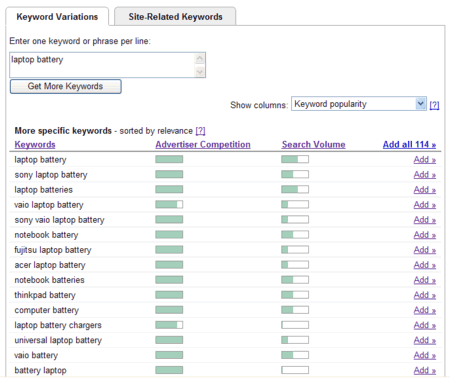
Dari gambar di atas terlihat bahwa keyword laptop battery sangat populer (lihat bar hijau pada bagian Search Volume), dan google menyarankan keyword yang berhubungan dengan laptop battery adalah sony laptop battery, notebook batterries, dan sebagainya. Informasi ini berguna jika Sobat memilki sebuah toko yang menjual laptop atau notebook dan memiliki sebuah web/toko online:
- Keyword laptop battery sangat populer, masukkan keyword ini dalam web/blog sobat
- Selain menggunakan keyword/kata kunci laptop battery, sebaiknya juga menggunakan kata kunci notebook battery dan kata kunci lain yang populer
- Merek tertentu (misalnya Sony) lebih populer daripada merek lain (misalnya Fujitsu)
Dalam keyword tool ini, kita juga bisa mengatur setting dari bahasa dan negara mana. Jadi, dengan Google Keyword Tool External ini, sobat bisa mencari dan mengetahui keyword-keyword yang sedang populer dicari orang-orang. Sobat juga bisa mengecek bagaiman keyword SEO blogspot saat ini, apakah masih banyak pesaingnya. Jika masih, maka beralihlah ke yang lain. :)
Nah, tool yang kedua ini untuk mengetahui top keywords atau kata kunci yang paling banyak dicari orang adalah Google Trends. Silakan buka google trend, maka akan muncul jendela pencarian dan daftar 10 kata kunci yang pupuler hari ini (berlaku di USA).
Sobat juga bisa lihat More Hot Trend untuk melihat 100 buah kata kunci (keywords) yang paling populer hari ini. Sobat juga bisa mengganti tanggal dengan tanggal kemarin atau waktu-waktu yang lain.
Di bagian atas halaman ada box yang digunakan untuk memasukkan keyword. Misalnya kita masukkan kata berikut: AMD, intel maka akan muncul grafik seperti ini.

Keterangan gambar:
- Kata kunci yang dimasukkan bisa 1 atau lebih dari satu
- Grafik jumlah orang yang mencari kata kunci tersebut di google (dalam contoh ini, intel – garis merah, dan amd = garis biru)
- Jumlah berita sehubungan kata kunci
- Titik di mana berita dipublikasi (misalnya pada titik A, harga stock Intel turun)
- Daftar berita
Dengan melihat gambar di atas dapat disimpulkan:
· Intel lebih populer daripada AMD
· Di akhir tahun 2005, pencarian kata kunci Intel meningkat, namun di awal tahun 2008 ini mengalami penurunan
Sobat juga bisa mengeset agar Google Trends menampilkan data pengunjung google dari negara mana dan tahun berapa.
Bagaimana? Apakah sobat pembaca ingin mencoba tool gratis yang disediakan google ini?
Cukup sekian lah postingan belajar SEO blogspot kali ini, semoga sobat bisa memanfaatkan tools dari google ini untuk mencari serta mengetahui sebuah keyword yang sedang banyak dicari orang (keyword populer).
Selamat mencoba!
Dari :
http://yasiranak252.blogspot.com/2010/12/rahasia-mengetahui-keyword-yang-paling.html
Read More..
Dari :
http://yasiranak252.blogspot.com/2010/12/rahasia-mengetahui-keyword-yang-paling.html
Membuat Judul Blog Berganti Ganti
Membuat Judul Blog Berganti Ganti
Seperti pada Judul diatas, kali ini kita akan membahas cara membuat judul blog seperti yang ada di blog saya ini.
Perhatikan Judul Blog saya !! Berubah rubah dengan tulisan tulisan berbeda yakan ?? Langsung saja yuu..
1. Buka dan Loggin Blogger
2. Masuk Ke Rancangan
3. Elemen Halaman
4. Tambah Gadget --> HTML/Java Script
5. Copaz Code saya ini.
Keterangan Code :
Tulisan Berwarna MERAH : Adalah Pesan yang ingin Kita Tulis di Judul
Tulisan Berwarna BIRU : Adalah Kecepatan Pergantian Teks
Tulisan Berwarna HIJAU : Adalah Satuan Delay dari tiap tiap Pergantian Teks
6. Save Lalu Lihat Blog Anda.
From :
http://yasiranak252.blogspot.com/2010/12/membuat-judul-blog-beganti-ganti.html Read More..
Jumat, 24 Desember 2010
Alasan Kenapa Belum Punya Pacar

Kuper, kurang pergaulan adalah penyebab utama kenapa seseorang sulit dapat pacar? Lingkup pergaulan dengan orang yang itu-itu aja membuat gak berkembang, termasuk dalam urusan cinta. Mereka gak punya banyak pilihan untuk bertemu dengan calon pacarnya.
2. Terlalu pemilih
Biasanya, orang-orang seperti ini menerapkan standar yang cukup tinggi mengenai kriteria cowok atau cewek bisa jadi pacar yang diinginkan. Bahkan gak jarang terlalu tinggi dan gak sesuai dengan dirinya. Tipe perfectionist, akibatnya udah bisa ditebak. Susah dapat pacar.
3. Kurang Percaya Diri
Rasa kurang percaya diri (PD) bisa menyebabkan seseorang vakum dalam dunia percintaan. Susah dapat pacar adalah sesuatu yang biasa bagi orang-orang seperti ini. Bahkan bisa merembet ke dalam aspek kehidupan sosialnya.
4. Terlalu sibuk dengan pekerjaan
Kesibukan menjadi hal yang lumrah di zaman modern yang serba materialistis ini. Yang jadi masalah adalah seringkali seseorang terlalu sibuk bekerja, mengejar karir atau study sehingga mengesampingkan urusan mencari pasangan. Masih mending kalo kesibukannya masih memungkinkan mereka untuk bertemu lawan jenis. Kalo gak..? Alamat susah dapat pacar. Harus ikutan Take me Out kayaknya. hehe…
5. Terlalu pendiam dan pemalu
Sebagian orang, terutama cewek merasa bingung bagaimana cara menghadapi cowok pendiam apalagi pemalu. Meski pun ada sebagian orang yang kepincut dengan sosok pendiam dan cool (seperti Saya). Tapi secara keseluruhan sosok cowok pendiam ini agak susah dapat pacar.
6. Terlalu cuek dan gak pengertian
Dalam menjalin sebuah hubungan, seseorang tentu ingin diperhatikan oleh pasangannya. gak percaya? Kalau terlalu cuek, siapa yang mau..?
7. Sulit Mengungkapkan cinta
Sudah jelas kenapa tipe orang seperti ini susah dapat pacar. Sulit mengungkapkan cinta, bisa dibilang gak berani mengungkapkan atau menunjukkan perasaan cinta terhadap orang yang dicintainya. Bagaimana dia tahu kamu mencintai dia kalo gak diungkapkan..? Berharap mata berbicara..?
8. Menutup diri dan tertutup
Orang-orang yang membuka diri saja belum tentu bisa dapat pacar dengan mudah. Terlebih orang-orang yang menutup dirinya terhadap orang lain terutama lawan jenis. Mungkin orang-orang seperti ni terlalu misterius kalee, yah..?
9. Punya banyak kebiasaan buruk
Setiap orang tentu punya sisi buruk, sifat buruk atau kebiasaan buruk. Tapi, kalau terlalu banyak sisi negatifnya, tentu orang-orang akan berfikir ulang untuk menjalin hubungan dengan orang tersebut.
10. Gak punya banyak kenalan atau relasi
Jangan pernah anggap remeh teman, kenalan, dan relasi, karna bisa jadi merekalah yang justru bisa ngenalin sama cewek atau cowok idaman kita. Mereka juga bisa menjadi senjata rahasia kita dalam mendekati seseorang yang kita taksir.
11. Kere
Maaf kalo judulnya agak ekstrem, tapi kenyataanya banyak sekali cewek yang lebih memilih cowok yang kaya atau minimal mempunyai penghasilan, apalagi di jaman sekarang dimana nafsu belanja para cewek yang cenderung jor-joran. cowok kaya banyak dicari karna mereka bisa menjamin hidup para cewek di masa depan seandainya mereka menikah.
12. Muka pas-pasan (atau malah dibawah standar)
Kita gak bisa menyangkal bahwa jaman sekarang banyak sekali orang yang sangat mementingkan fisik pasangan mereka (terutama muka), hal ini mungkin dikarenakan mereka akan lebih percaya diri saat berjalan bersama pasangan mereka yang ganteng atau cantik.
13. Egois
Dalam berpacaran dan berumah tangga, kita harus dapat memahami kelebihan dan kekurangan pasangan kita, sehingga kita gak bisa memaksakan pasangan berbuat lebih untuk kita. Dan menurut survey independen, hampir semua orang menginginkan pasangan yang pengertian dan tidak egois.
14. Gak Romantis
Banyak orang yang bilang bahwa romantis adalah bumbu yang paling penting dalam menjalin asmara, sehingga baik cewek maupun cowok akan lebih menyukai pasangan yang romantis dan tidak kaku dalam berpacaran.
15. Gak Humoris
Seseorang yang humoris akan sangat dibutuhkan, diharapakan dapat menghibur kalo sedang banyak masalah. Dengan sisi lucu yang ada dalam diri, bisa mendapatkan simpati dari cewek ataupun cowok.
16. Mengincar nafsu semata
Cinta adalah hal yang sakral yang meliputi perasaan, hati, dan rasa saling membutuhkan antara dua insan manusia yang saling jatuh cinta, tapi banyak sekali pria yang justru menjalin asmara bukan untuk membangun rasa saling membutuhkan, melainkan untuk mengincar tubuh si gadis, hal inilah yang sering membuat gadis sering melihat sebelah mata padanya.
Sumber kaskus.us Read More..
Jumat, 17 Desember 2010
Membuat Tempe
Tempe merupakan makanan khas indonesia , selain mengandung protein nabati yang tinggi , juga harganya pun sangat terjangkau , murah dan memasyarakat , kalau selama ini umumnya ibu-ibu rumah tangga membeli tempe dari pasar-pasar atau supermarket , tidak ada salahnya kali ini untuk mencoba membuat sendiri di rumah ... who knows nantinya malah berkembang jadi sebuah usaha rumahan atau home industri
Note : artikel di ambil dari http://dapoerkami.bravehost.com
OK , selamat mencoba
peralatan yg diperlukan:
wadah dgn permukaan lebar untuk mencampur ragi dan kedelai (saya menggunakan alas/cetakan yg ada dalam oven)
4bh kantong plastik ukuran 1kg
jarum atau tusuk gigi tuk melubang2i plastik
rak berjeruji (rak yg ada di oven/kulkas) untuk alas tempe
bahan:
1kg kedelai, cuci bersih dan rendam di dalam wadah yg cukup besar selama 24jam.
ragi tempe sejumlah yg direkomendasikan pada kemasannya
cara membuat:
setelah direndam permukaan kedelai akan sedikit berbusa2, remas2 kedelai atau gesek2 diantara kedua belah telapak tangan guna melepas sebagian kulit arinya, cuci kedelai dibawah air mengalir agar kulit ari mengambang dan mengalir keluar dgn sendirinya.
sambil membersihkan kedelai didihkan air didalam panci besar, kemudian masukan kedelai yg telah dibersihkan dan rebus hingga empuk, setelah benar2 empuk, angkat dan buang airnya. cuci kedelai dibawah air mengalir sambil diremas2 perlahan utk membuang sisa kulit arinya, kemudian tiriskan hingga kering. jadinya ca 1550g.
atur kedelai didalam wadah dgn permukaan lebar, setelah dingin bubuhi permukaan kedelai dgn ragi tempe, aduk rata, kemudian masukan kedelai yg telah diberi ragi kedalam plastik (300-400g atau sesuai selera), kira2 ketebalan tempe menjadi +2-3cm, tutup rapat ujungnya dgn bantuan api lilin, kemudian tusuk2 bagian atas dan bawah plastik menggunakan jarum ataw tusuk gigi(semakin banyak semakin baik).
atur bungkusan tempe didalam lemari yg telah dialasi rak berjeruji agar ada sirkulasi udaranya, simpan selama 36jam. siap diolah.
catatan:
apabila tdk langsung diolah, dalam wadah siram tempe sesaat stl jadi dgn air mendidih ca 5menit, masukan ke dalam plastik khusus tuk freezer, bekukan dalam freezer.
Senin, 15 November 2010
Satellite


In the context of spaceflight, a satellite is an object which has been placed into orbit by human endeavor. Such objects are sometimes called artificial satellites to distinguish them from natural satellites such as the Moon.
The first artificial satellite, Sputnik 1, was launched by the Soviet Union in 1957. Since then, thousands of satellites have been launched into orbit around the Earth. These originate from more than 50 countries and have used the satellite launching capabilities of ten nations. A few hundred satellites are currently operational, whereas thousands of unused satellites and satellite fragments orbit the Earth as space debris. A few space probes have been placed into orbit around other bodies and become artificial satellites to the Moon, Venus, Mars, Jupiter and Saturn.
Satellites are used for a large number of purposes. Common types include military and civilian Earth observation satellites, communications satellites, navigation satellites, weather satellites, and research satellites. Space stations and human spacecraft in orbit are also satellites. Satellite orbits vary greatly, depending on the purpose of the satellite, and are classified in a number of ways. Well-known (overlapping) classes include low Earth orbit, polar orbit, and geostationary orbit.
Satellites are usually semi-independent computer-controlled systems. Satellite subsystems attend many tasks, such as power generation, thermal control, telemetry, attitude control and orbit control.
History
Early conceptions
The first fictional depiction of a satellite being launched into orbit is a short story by Edward Everett Hale, The Brick Moon. The story is serialized in The Atlantic Monthly, starting in 1869.[1][2] The idea surfaces again in Jules Verne's The Begum's Fortune (1879).
In 1903 Konstantin Tsiolkovsky (1857–1935) published The Exploration of Cosmic Space by Means of Reaction Devices (in Russian: Исследование мировых пространств реактивными приборами), which is the first academic treatise on the use of rocketry to launch spacecraft. He calculated the orbital speed required for a minimal orbit around the Earth at 8 km/s, and that a multi-stage rocket fueled by liquid propellants could be used to achieve this. He proposed the use of liquid hydrogen and liquid oxygen, though other combinations can be used.
In 1928 Slovenian Herman Potočnik (1892–1929) published his sole book, The Problem of Space Travel — The Rocket Motor (German: Das Problem der Befahrung des Weltraums — der Raketen-Motor), a plan for a breakthrough into space and a permanent human presence there. He conceived of a space station in detail and calculated its geostationary orbit. He described the use of orbiting spacecraft for detailed peaceful and military observation of the ground and described how the special conditions of space could be useful for scientific experiments. The book described geostationary satellites (first put forward by Tsiolkovsky) and discussed communication between them and the ground using radio, but fell short of the idea of using satellites for mass broadcasting and as telecommunications relays.
In a 1945 Wireless World article the English science fiction writer Arthur C. Clarke (1917–2008) described in detail the possible use of communications satellites for mass communications.[3] Clarke examined the logistics of satellite launch, possible orbits and other aspects of the creation of a network of world-circling satellites, pointing to the benefits of high-speed global communications. He also suggested that three geostationary satellites would provide coverage over the entire planet.
History of artificial satellites

The first artificial satellite was Sputnik 1, launched by the Soviet Union on October 4, 1957, and initiating the Soviet Sputnik program, with Sergei Korolev as chief designer. This in turn triggered the Space Race between the Soviet Union and the United States.
Sputnik 1 helped to identify the density of high atmospheric layers through measurement of its orbital change and provided data on radio-signal distribution in the ionosphere. The unanticipated announcement of Sputnik 1's success precipitated the Sputnik crisis in the United States and ignited the so-called Space Race within the Cold War.
Sputnik 2 was launched on November 3, 1957 and carried the first living passenger into orbit, a dog named Laika.[4]
In May, 1946, Project RAND had released the Preliminary Design of a Experimental World-Circling Spaceship, which stated, "A satellite vehicle with appropriate instrumentation can be expected to be one of the most potent scientific tools of the Twentieth Century.[5] The United States had been considering launching orbital satellites since 1945 under the Bureau of Aeronautics of the United States Navy. The United States Air Force's Project RAND eventually released the above report, but did not believe that the satellite was a potential military weapon; rather, they considered it to be a tool for science, politics, and propaganda. In 1954, the Secretary of Defense stated, "I know of no American satellite program."[6]
On July 29, 1955, the White House announced that the U.S. intended to launch satellites by the spring of 1958. This became known as Project Vanguard. On July 31, the Soviets announced that they intended to launch a satellite by the fall of 1957.
Following pressure by the American Rocket Society, the National Science Foundation, and the International Geophysical Year, military interest picked up and in early 1955 the Air Force and Navy were working on Project Orbiter, which involved using a Jupiter C rocket to launch a satellite. The project succeeded, and Explorer 1 became the United States' first satellite on January 31, 1958.[7]
In June 1961, three-and-a-half years after the launch of Sputnik 1, the Air Force used resources of the United States Space Surveillance Network to catalog 115 Earth-orbiting satellites.[8]
The largest artificial satellite currently orbiting the Earth is the International Space Station.
Space Surveillance Network
The United States Space Surveillance Network (SSN) has been tracking space objects since 1957 when the Soviets opened the space age with the launch of Sputnik I. Since then, the SSN has tracked more than 26,000 space objects orbiting Earth. The SSN currently tracks more than 8,000 man-made orbiting objects. The rest have re-entered Earth's atmosphere and disintegrated, or survived re-entry and impacted the Earth. The space objects now orbiting Earth range from satellites weighing several tons to pieces of spent rocket bodies weighing only 10 pounds. About seven percent of the space objects are operational satellites (i.e. ~560 satellites), the rest are space debris.[9] USSTRATCOM is primarily interested in the active satellites, but also tracks space debris which upon reentry might otherwise be mistaken for incoming missiles. The SSN tracks space objects that are 10 centimeters in diameter (baseball size) or larger.
A search of the NSSDC Master Catalog at the end of October 2010 listed 6,578 satellites launched into orbit since 1957, the latest being Chang'e 2, on 1 October 2010.[10]
Non-military satellite services
There are three basic categories of non-military satellite services:[11]
Fixed satellite services
Fixed satellite services handle hundreds of billions of voice, data, and video transmission tasks across all countries and continents between certain points on the Earth’s surface.
Mobile satellite systems
Mobile satellite systems help connect remote regions, vehicles, ships, people and aircraft to other parts of the world and/or other mobile or stationary communications units, in addition to serving as navigation systems.
Scientific research satellites (commercial and noncommercial)
Scientific research satellites provide us with meteorological information, land survey data (e.g., remote sensing), Amateur (HAM) Radio, and other different scientific research applications such as earth science, marine science, and atmospheric research.
Types

- Anti-Satellite weapons/"Killer Satellites" are satellites that are designed to destroy enemy warheads, satellites, other space assets. They may have particle weapons, energy weapons, kinetic weapons, nuclear and/or conventional missiles and/or a combination of these weapons.
- Astronomical satellites are satellites used for observation of distant planets, galaxies, and other outer space objects.
- Biosatellites are satellites designed to carry living organisms, generally for scientific experimentation.
- Communications satellites are satellites stationed in space for the purpose of telecommunications. Modern communications satellites typically use geosynchronous orbits, Molniya orbits or Low Earth orbits.
- Miniaturized satellites are satellites of unusually low weights and small sizes.[12] New classifications are used to categorize these satellites: minisatellite (500–100 kg), microsatellite (below 100 kg), nanosatellite (below 10 kg).
- Navigational satellites are satellites which use radio time signals transmitted to enable mobile receivers on the ground to determine their exact location. The relatively clear line of sight between the satellites and receivers on the ground, combined with ever-improving electronics, allows satellite navigation systems to measure location to accuracies on the order of a few meters in real time.
- Reconnaissance satellites are Earth observation satellite or communications satellite deployed for military or intelligence applications. Very little is known about the full power of these satellites, as governments who operate them usually keep information pertaining to their reconnaissance satellites classified.
- Earth observation satellites are satellites intended for non-military uses such as environmental monitoring, meteorology, map making etc. (See especially Earth Observing System.)
- Space stations are man-made structures that are designed for human beings to live on in outer space. A space station is distinguished from other manned spacecraft by its lack of major propulsion or landing facilities — instead, other vehicles are used as transport to and from the station. Space stations are designed for medium-term living in orbit, for periods of weeks, months, or even years.
- Tether satellites are satellites which are connected to another satellite by a thin cable called a tether.
- Weather satellites are primarily used to monitor Earth's weather and climate.[13]
Orbit types
 | It has been suggested that this article or section be merged into List of orbits. (Discuss) |
Main article: List of orbits

The first satellite, Sputnik 1, was put into orbit around Earth and was therefore in geocentric orbit. By far this is the most common type of orbit with approximately 2456 artificial satellites orbiting the Earth. Geocentric orbits may be further classified by their altitude, inclination and eccentricity.
The commonly used altitude classifications are Low Earth Orbit (LEO), Medium Earth Orbit (MEO) and High Earth Orbit (HEO). Low Earth orbit is any orbit below 2000 km, and Medium Earth Orbit is any orbit higher than that but still below the altitude for geosynchronous orbit at 35786 km. High Earth Orbit is any orbit higher than the altitude for geosynchronous orbit.
Centric classifications
- Galactocentric orbit: An orbit about the center of a galaxy. Earth's sun follows this type of orbit about the galactic center of the Milky Way.
- Heliocentric orbit: An orbit around the Sun. In our Solar System, all planets, comets, and asteroids are in such orbits, as are many artificial satellites and pieces of space debris. Moons by contrast are not in a heliocentric orbit but rather orbit their parent planet.
- Geocentric orbit: An orbit around the planet Earth, such as the Moon or artificial satellites. Currently there are approximately 2465 artificial satellites orbiting the Earth.
- Areocentric orbit: An orbit around the planet Mars, such as moons or artificial satellites.
Altitude classifications
- Low Earth Orbit (LEO): Geocentric orbits ranging in altitude from 0–2000 km (0–1240 miles)
- Medium Earth Orbit (MEO): Geocentric orbits ranging in altitude from 2000 km (1240 miles) to just below geosynchronous orbit at 35786 km (22240 miles). Also known as an intermediate circular orbit.
- High Earth Orbit (HEO): Geocentric orbits above the altitude of geosynchronous orbit 35786 km (22240 miles).

Inclination classifications
- Inclined orbit: An orbit whose inclination in reference to the equatorial plane is not zero degrees.
- Polar orbit: An orbit that passes above or nearly above both poles of the planet on each revolution. Therefore it has an inclination of (or very close to) 90 degrees.
- Polar sun synchronous orbit: A nearly polar orbit that passes the equator at the same local time on every pass. Useful for image taking satellites because shadows will be nearly the same on every pass.
Eccentricity classifications
- Circular orbit: An orbit that has an eccentricity of 0 and whose path traces a circle.
- Hohmann transfer orbit: An orbital maneuver that moves a spacecraft from one circular orbit to another using two engine impulses. This maneuver was named after Walter Hohmann.
- Elliptic orbit: An orbit with an eccentricity greater than 0 and less than 1 whose orbit traces the path of an ellipse.
- Geosynchronous transfer orbit: An elliptic orbit where the perigee is at the altitude of a Low Earth Orbit (LEO) and the apogee at the altitude of a geosynchronous orbit.
- Geostationary transfer orbit: An elliptic orbit where the perigee is at the altitude of a Low Earth Orbit (LEO) and the apogee at the altitude of a geostationary orbit.
- Molniya orbit: A highly elliptic orbit with inclination of 63.4° and orbital period of half of a sidereal day (roughly 12 hours). Such a satellite spends most of its time over a designated area of the planet.
- Tundra orbit: A highly elliptic orbit with inclination of 63.4° and orbital period of one sidereal day (roughly 24 hours). Such a satellite spends most of its time over a designated area of the planet.
- Hyperbolic orbit: An orbit with the eccentricity greater than 1. Such an orbit also has a velocity in excess of the escape velocity and as such, will escape the gravitational pull of the planet and continue to travel infinitely.
- Parabolic orbit: An orbit with the eccentricity equal to 1. Such an orbit also has a velocity equal to the escape velocity and therefore will escape the gravitational pull of the planet and travel until its velocity relative to the planet is 0. If the speed of such an orbit is increased it will become a hyperbolic orbit.
- Escape orbit (EO): A high-speed parabolic orbit where the object has escape velocity and is moving away from the planet.
- Capture orbit: A high-speed parabolic orbit where the object has escape velocity and is moving toward the planet.
Synchronous classifications
- Synchronous orbit: An orbit where the satellite has an orbital period equal to the average rotational period (earth's is: 23 hours, 56 minutes, 4.091 seconds) of the body being orbited and in the same direction of rotation as that body. To a ground observer such a satellite would trace an analemma (figure 8) in the sky.
- Semi-synchronous orbit (SSO): An orbit with an altitude of approximately 20200 km (12544.2 miles) and an orbital period equal to one-half of the average rotational period (earth's is approximately 12 hours) of the body being orbited
- Geosynchronous orbit (GSO): Orbits with an altitude of approximately 35786 km (22240 miles). Such a satellite would trace an analemma (figure 8) in the sky.
- Geostationary orbit (GEO): A geosynchronous orbit with an inclination of zero. To an observer on the ground this satellite would appear as a fixed point in the sky.[14]
- Clarke orbit: Another name for a geostationary orbit. Named after scientist and writer Arthur C. Clarke.
- Supersynchronous orbit: A disposal / storage orbit above GSO/GEO. Satellites will drift west. Also a synonym for Disposal orbit.
- Subsynchronous orbit: A drift orbit close to but below GSO/GEO. Satellites will drift east.
- Graveyard orbit: An orbit a few hundred kilometers above geosynchronous that satellites are moved into at the end of their operation.
- Disposal orbit: A synonym for graveyard orbit.
- Junk orbit: A synonym for graveyard orbit.
- Geostationary orbit (GEO): A geosynchronous orbit with an inclination of zero. To an observer on the ground this satellite would appear as a fixed point in the sky.[14]
- Areosynchronous orbit: A synchronous orbit around the planet Mars with an orbital period equal in length to Mars' sidereal day, 24.6229 hours.
- Areostationary orbit (ASO): A circular areosynchronous orbit on the equatorial plane and about 17000 km(10557 miles) above the surface. To an observer on the ground this satellite would appear as a fixed point in the sky.
- Heliosynchronous orbit: An heliocentric orbit about the Sun where the satellite's orbital period matches the Sun's period of rotation. These orbits occur at a radius of 24,360 Gm (0.1628 AU) around the Sun, a little less than half of the orbital radius of Mercury.
Special classifications
- Sun-synchronous orbit: An orbit which combines altitude and inclination in such a way that the satellite passes over any given point of the planets's surface at the same local solar time. Such an orbit can place a satellite in constant sunlight and is useful for imaging, spy, and weather satellites.
- Moon orbit: The orbital characteristics of earth's moon. Average altitude of 384403 kilometres (238857 mi), elliptical-inclined orbit.
Pseudo-orbit classifications
- Horseshoe orbit: An orbit that appears to a ground observer to be orbiting a certain planet but is actually in co-orbit with the planet. See asteroids 3753 (Cruithne) and 2002 AA29.
- Exo-orbit: A maneuver where a spacecraft approaches the height of orbit but lacks the velocity to sustain it.
- Suborbital spaceflight: A synonym for exo-orbit.
- Lunar transfer orbit (LTO)
- Prograde orbit: An orbit with an inclination of less than 90°. Or rather, an orbit that is in the same direction as the rotation of the primary.
- Retrograde orbit: An orbit with an inclination of more than 90°. Or rather, an orbit counter to the direction of rotation of the planet. Apart from those in sun-synchronous orbit, few satellites are launched into retrograde orbit because the quantity of fuel required to launch them is much greater than for a prograde orbit. This is because when the rocket starts out on the ground, it already has an eastward component of velocity equal to the rotational velocity of the planet at its launch latitude.
- Halo orbit and Lissajous orbit: Orbits "around" Lagrangian points.
Satellite modules
The satellite’s functional versatility is imbedded within its technical components and its operations characteristics. Looking at the “anatomy” of a typical satellite, one discovers two modules.[11] Note that some novel architectural concepts such as Fractionated Spacecraft somewhat upset this taxonomy.
Spacecraft bus or service module
This bus module consist of the following subsystems:
- The Structural Subsystems
The structural subsystem provides the mechanical base structure, shields the satellite from extreme temperature changes and micro-meteorite damage, and controls the satellite’s spin functions.
- The Telemetry Subsystems (aka Command and Data Handling, C&DH)
The telemetry subsystem monitors the on-board equipment operations, transmits equipment operation data to the earth control station, and receives the earth control station’s commands to perform equipment operation adjustments.
- The Power Subsystems
The power subsystem consists of solar panels and backup batteries that generate power when the satellite passes into the earth’s shadow. Nuclear power sources (Radioisotope thermoelectric generators) have been used in several successful satellite programs including the Nimbus program (1964–1978).[15]
- The Thermal Control Subsystems
The thermal control subsystem helps protect electronic equipment from extreme temperatures due to intense sunlight or the lack of sun exposure on different sides of the satellite’s body (e.g. Optical Solar Reflector)
- The Attitude and Orbit Controlled Control Subsystems
Main article: Attitude control
The attitude and orbit controlled subsystem consists of small rocket thrusters that keep the satellite in the correct orbital position and keep antennas positioning in the right directions.
Communication payload
The second major module is the communication payload, which is made up of transponders. A transponder is capable of :
- Receiving uplinked radio signals from earth satellite transmission stations (antennas).
- Amplifying received radio signals
- Sorting the input signals and directing the output signals through input/output signal multiplexers to the proper downlink antennas for retransmission to earth satellite receiving stations (antennas).
End of life
When satellites reach the end of their mission, satellite operators have the option of de-orbiting the satellite, leaving the satellite in its current orbit or moving the satellite to a graveyard orbit. Historically, due to budgetary constraints at the beginning of satellite missions, satellites were rarely designed to be de-orbited. One example of this practice is the satellite Vanguard 1. Launched in 1958, Vanguard 1, the 4th manmade satellite put in Geocentric orbit, was still in orbit as of August 2009.[16]
Instead of being de-orbited, most satellites are either left in their current orbit or moved to a graveyard orbit.[17] As of 2002, the FCC now requires all geostationary satellites to commit to moving to a graveyard orbit at the end of their operational life prior to launch.[18]
Launch-capable countries
Main article: Timeline of first orbital launches by nationality

This list includes countries with an independent capability to place satellites in orbit, including production of the necessary launch vehicle. Note: many more countries have the capability to design and build satellites but are unable to launch them, instead relying on foreign launch services. This list does not consider those numerous countries, but only lists those capable of launching satellites indigenously, and the date this capability was first demonstrated. Does not include consortium satellites or multi-national satellites.
Order | Country | Year of first launch | Rocket | Satellite |
|---|---|---|---|---|
| 1 |  Soviet Union Soviet Union | 1957 | Sputnik-PS | Sputnik 1 |
| 2 |  United States United States | 1958 | Juno I | Explorer 1 |
| 3 |  France France | 1965 | Diamant | Astérix |
| 4 |  Japan Japan | 1970 | Lambda-4S | Ōsumi |
| 5 |  China China | 1970 | Long March 1 | Dong Fang Hong I |
| 6 |  United Kingdom United Kingdom | 1971 | Black Arrow | Prospero X-3" |
| 7 |  India India | 1980 | SLV | Rohini |
| 8 |  Israel Israel | 1988 | Shavit | Ofeq 1 |
| _ |  Russia[1] Russia[1] | 1992 | Soyuz-U | Kosmos 2175 |
| _ |  Ukraine[1] Ukraine[1] | 1992 | Tsyklon-3 | Strela |
| 9 |  Iran Iran | 2009 | Safir-2 | Omid |
Notes
- Russia and Ukraine were parts of the Soviet Union and thus inherited their launch capability without the need to develop it indigenously. Through Soviet Union they also are on the number one position in this list of accomplishments.
- France, United Kingdom launched their first satellites by own launchers from foreign spaceports.
- North Korea (1998) and Iraq (1989) have claimed orbital launches (satellite and warhead accordingly), but these claims are unconfirmed.
- In addition to the above, countries such as South Africa, Spain, Italy, Germany, Canada, Australia, Argentina, Egypt and private companies such as OTRAG, have developed their own launchers, but have not had a successful launch.
- As of 2009, only eight countries from the list above ( Russia and Ukraine instead of USSR, also USA, Japan, China, India, Israel, and Iran) and one regional organization (the European Space Agency, ESA) have independently launched satellites on their own indigenously developed launch vehicles. (The launch capabilities of the United Kingdom and France now fall under the ESA.)
- Several other countries, including South Korea, Brazil, Pakistan, Romania, Taiwan, Indonesia, Kazakhstan, Australia, Malaysia[citation needed] and Turkey, are at various stages of development of their own small-scale launcher capabilities.
- South Korea launched a KSLV rocket (created with assistance of Russia) in 25 August 2009, but it failed to put satellite STSAT-2 into precise orbit and the satellite did not start to function.
- North Korea claimed a launch in April 2009, but U.S. and South Korean defense officials and weapons experts later reported that the rocket failed to send a satellite into orbit, if that was the goal.[19][20] The United States, Japan and South Korea believe this was actually a ballistic missile test, which is a claim also made after North Korea's 1998 satellite launch, and later rejected.
Launch capable private entities
- Orbital Sciences Corporation is conducting launches using its Taurus I rocket.
- On September 28, 2008, the private aerospace firm SpaceX successfully launched its Falcon 1 rocket in to orbit. This marked the first time that a privately built liquid-fueled booster was able to reach orbit.[21] The rocket carried a prism shaped 1.5 m (5 ft) long payload mass simulator that was set into orbit. The dummy satellite, known as Ratsat, will remain in orbit for between five and ten years before burning up in the atmosphere.[21]
A few other private companies are capable of sub-orbital launches.
First satellites of countries


While Canada was the third country to build a satellite which was launched into space,[25] it was launched aboard a U.S. rocket from a U.S. spaceport. The same goes for Australia, who launched on-board a donated Redstone rocket. The first Italian-launched was San Marco 1, launched on 15 December 1964 on a U.S. Scout rocket from Wallops Island (VA,USA) with an Italian Launch Team trained by NASA.[26] Australia's launch project (WRESAT) involved a donated U.S. missile and U. S. support staff as well as a joint launch facility with the United Kingdom.[27]
Planned first satellites
Azerbaijan is developing its space satellite Azerspace. According to the approved plan, Azerspace satellite will be launched into orbit in 2011.[28]
Bangladesh announced in 2009 that it intends to launch its first satellite into space by 2011.[29]
Croatia has a goal to construct a satellite by 2013–2014. Launch into Earth orbit would be done by a foreign provider.[30]
Latvia The project of nano-satellite Venta-1 which will be built in Latvia, in cooperation with the German engineers. The satellite is intended for automatic system of identification of the ships of a sailing charter developed by OHB-System AG. The launch of the satellite was planned for the end of 2009 using the Indian carrier rocket. Due to the financial crisis the launch has been postponed until 2010.
Peru is developing its space satellite with the National Engineering University, called Chasqui 1. The nano-satellite will be launched into orbit by 2011, and will have an expected 60-day lifespan. As payload are installed two small VGA cameras. One of both will have a NIR filter.
Romania announced that it has finished construction of its first satellite, called Goliat. The satellite will be launched into orbit in 2010.[31]
Sri Lanka has a goal to construct two satellites. Sri Lankan Telecommunications Regulatory Commission has signed an agreement with Surrey Satellite Technology Ltd to get relevant help and resources. Launch into Earth orbit would be done by a foreign provider.[32][33]
Tunisia is developing its first satellite, ERPSat01. Consisting of a CubeSat of 1 kg weight, it will be developed by the Sfax School of Engineering. ERPSat satellite is planned to be launched into orbit in 2013.[34]
Attacks on satellites
For more details on this topic, see Anti-satellite weapon.
In recent times satellites have been hacked by militant organizations to broadcast propaganda and to pilfer classified information from military communication networks.[35][36]
As test, satellites in low earth orbit have been destroyed by ballistic missiles launched from earth. Russia, the United States and China have demonstrated the ability to eliminate satellites.[37] In 2007 the Chinese military shot down an aging weather satellite,[37] followed by the US Navy shooting down a defunct spy satellite in February 2008.[38]
Jamming
Due to the low received signal strength of satellite transmissions, they are prone to jamming by land-based transmitters. Such jamming is limited to the geographical area within the transmitter's range. GPS satellites are potential targets for jamming,[39][40] but satellite phone and television signals have also been subjected to jamming.[41][42]
Also, it is trivial to transmit a carrier radio signal to a geostationary satellite and thus interfere with the legitimate uses of the satellite's transponder. It is common for earth stations to transmit at the wrong time or on the wrong frequency in commercial satellite space, and dual-illuminate the transponder, rendering the frequency unusable. Satellite operators now have sophisticated monitoring that enables them to pinpoint the source of any carrier and manage the transponder space effectively.
From:
http://en.wikipedia.org/
Langganan:
Postingan (Atom)